

GStreamer - ZED Sensors CSV Sink

Open in ClaudeOpen in ChatGPT

The ZED Sensors Data CSV Sink, zeddatacsvsink GStreamer element, is a sink that allows logging ZED Mini and ZED 2 sensors data to a CSV file.

The source code of this plugin is a complete example of how to process the ZED metadata in a GStreamer element to retrieve sensor data.

Properties

append : Append to an already existing CSV file
flags: readable, writable
Boolean. Default: false
async : Go asynchronously to PAUSED
flags: readable, writable
Boolean. Default: true
blocksize : Size in bytes to pull per buffer (0 = default)
flags: readable, writable
Unsigned Integer. Range: 0 - 4294967295 Default: 4096
enable-last-sample : Enable the last-sample property
flags: readable, writable
Boolean. Default: true
last-sample : The last sample received in the sink
flags: readable
Boxed pointer of type "GstSample"
location : Location of the CSV file to write
flags: readable, writable
String. Default: ""
max-bitrate : The maximum bits per second to render (0 = disabled)
flags: readable, writable
Unsigned Integer64. Range: 0 - 18446744073709551615 Default: 0
max-lateness : Maximum number of nanoseconds that a buffer can be late before it is dropped (-1 unlimited)
flags: readable, writable
Integer64. Range: -1 - 9223372036854775807 Default: -1
name : The name of the object
flags: readable, writable, 0x2000
String. Default: "zeddatacsvsink0"
parent : The parent of the object
flags: readable, writable, 0x2000
Object of type "GstObject"
processing-deadline : Maximum processing time for a buffer in nanoseconds
flags: readable, writable
Unsigned Integer64. Range: 0 - 18446744073709551615 Default: 20000000
qos : Generate Quality-of-Service events upstream
flags: readable, writable
Boolean. Default: false
render-delay : Additional render delay of the sink in nanoseconds
flags: readable, writable
Unsigned Integer64. Range: 0 - 18446744073709551615 Default: 0
stats : Sink Statistics
flags: readable
Boxed pointer of type "GstStructure"
average-rate: 0
dropped: 0
rendered: 0
sync : Sync on the clock
flags: readable, writable
Boolean. Default: false
throttle-time : The time to keep between rendered buffers (0 = disabled)
flags: readable, writable
Unsigned Integer64. Range: 0 - 18446744073709551615 Default: 0
ts-offset : Timestamp offset in nanoseconds
flags: readable, writable
Integer64. Range: -9223372036854775808 - 9223372036854775807 Default: 0

CSV Format

The following information is saved in the CSV file:

  • TIMESTAMP: data timestamp in [ns].
  • STREAM_TYPE: type of stream acquired by zedsrc (see ZedInfo data structure).
  • CAM_MODEL: camera model used to acquire data (see ZedInfo data structure).
  • GRAB_W: width of camera frames.
  • GRAB_H: height of camera frames.
  • POSE_VAL: 1 if the camera pose is valid.
  • POS_TRK_STATE: status of the positional tracking algorithm (see ZedPose data structure).
  • POS_X_[m]: X coordinate of the camera position in [m].
  • POS_Y_[m]: Y coordinate of the camera position in [m].
  • POS_Z_[m]: Z coordinate of the camera position in [m].
  • OR_X_[rad]: orientation of the camera around the X axis in [rad].
  • OR_Y_[rad]: orientation of the camera around the Y axis in [rad].
  • OR_Z_[rad]: orientation of the camera around the Z axis in [rad].
  • IMU_VAL: 1 if IMU data are valid.
  • ACC_X_[m/s²]: acceleration value along the X axis in [m/s²].
  • ACC_Y_[m/s²]: acceleration value along the Y axis in [m/s²].
  • ACC_Z_[m/s²]: acceleration value along the Z axis in [m/s²].
  • GYRO_X_[rad/s]: angular velocity around the X axis in [rad/s].
  • GYRO_Y_[rad/s]: angular velocity around the Y axis in [rad/s].
  • GYRO_Z_[rad/s]: angular velocity around the Z axis in [rad/s].
  • MAG_VAL: 1 if magnetometer data are valid.
  • MAG_X_[uT]: magnetic field value along the X axis in [µT].
  • MAG_Y_[uT]: magnetic field value along the Y axis in [µT].
  • MAG_Z_[uT]: magnetic field value along the Z axis in [µT].
  • ENV_VAL: 1 if environment data are valid.
  • TEMP_[°C]: internal camera temperature in [°C]
  • PRESS_[hPa]: atmospheric pressure in [hPa]
  • TEMP_VAL: 1 if camera CMOS temperatures are valid.
  • TEMP_L_[°C]: temperature of the left CMOS sensor in [°C].
  • TEMP_R_[°C]: temperature of the right CMOS sensor in [°C].

Example pipelines

Sensors data logging to CSV file

The following is a pipeline to acquire a stream at the default resolution with RGB and Depth data and save the sensor data to a CSV file for logging:
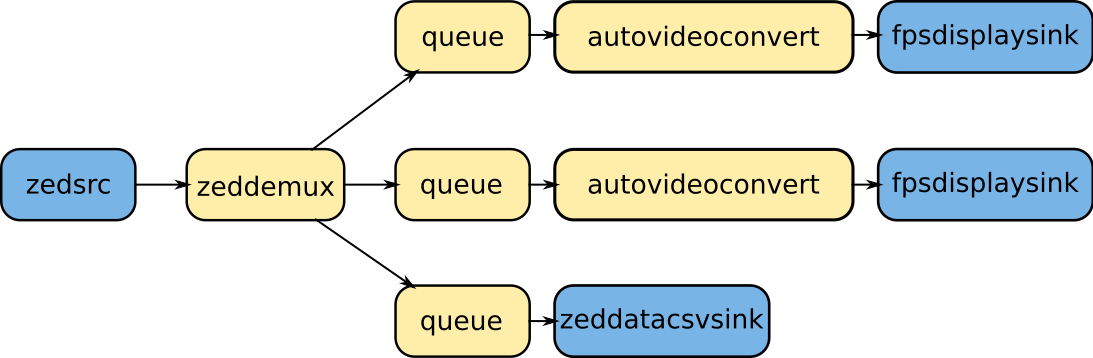
gst-launch-1.0 zedsrc stream-type=4 ! \
zeddemux stream-data=true name=demux \
demux.src_left ! queue ! autovideoconvert ! fpsdisplaysink \
demux.src_aux ! queue ! autovideoconvert ! fpsdisplaysink \
demux.src_data ! queue ! zeddatacsvsink location="${HOME}/test_csv.csv" append=FALSE

image

a zeddemux element is required, with stream-data=true, to create a branch of the pipeline where only sensor data flows.